Node Fundamentals
Node is a powerful framework for building backend services using JavaScript. It utilizes an event-driven, non-blocking model and built-in modules for efficient application development.
Node is an open-source, cross-platform runtime environment for creating backend services with JavaScript. It utilizes an event-driven, non-blocking model for efficient parallel operations.
The first chapter will cover Node’s introduction, functionality, popularity, CLI basics, modules, packages, synchronous/asynchronous operations, and its event-driven, non-blocking model.
Introducing Node
Ryan Dahl created Node in 2009, inspired by V8’s event-driven model for efficient server-side applications.
Node enables JavaScript execution on any machine without a web browser, acting as an interface to Google’s V8 JavaScript engine.
Node is a server runtime environment that uses an event-driven model to enable asynchronous execution of slow operations outside the main thread. This allows for efficient software application development with JavaScript.
Node allows asynchronous execution of slow operations using APIs, eliminating the need for multiple threads and improving efficiency. Event-driven programming, utilizing events and handlers, manages code execution after asynchronous operations.
The JavaScript Language
JavaScript was chosen for Node because it is simple, flexible, and popular, and its first-class functions allow for effective handling of asynchronous operations.
Using JavaScript for both frontend and backend development offers several advantages, including a single language for the full stack, better integrations, and the ability to share code and responsibilities across projects. This approach simplifies development, reduces dependencies, and makes hiring developers easier.
Executing Node Code
To use Node, ensure it is installed and the version is 20.x or higher. macOS users can install Node via the Node website, Homebrew, or NVM. Windows users are advised to use the Windows subsystem for Linux for better compatibility.
Start a Node REPL session by issuing the node command in a terminal.
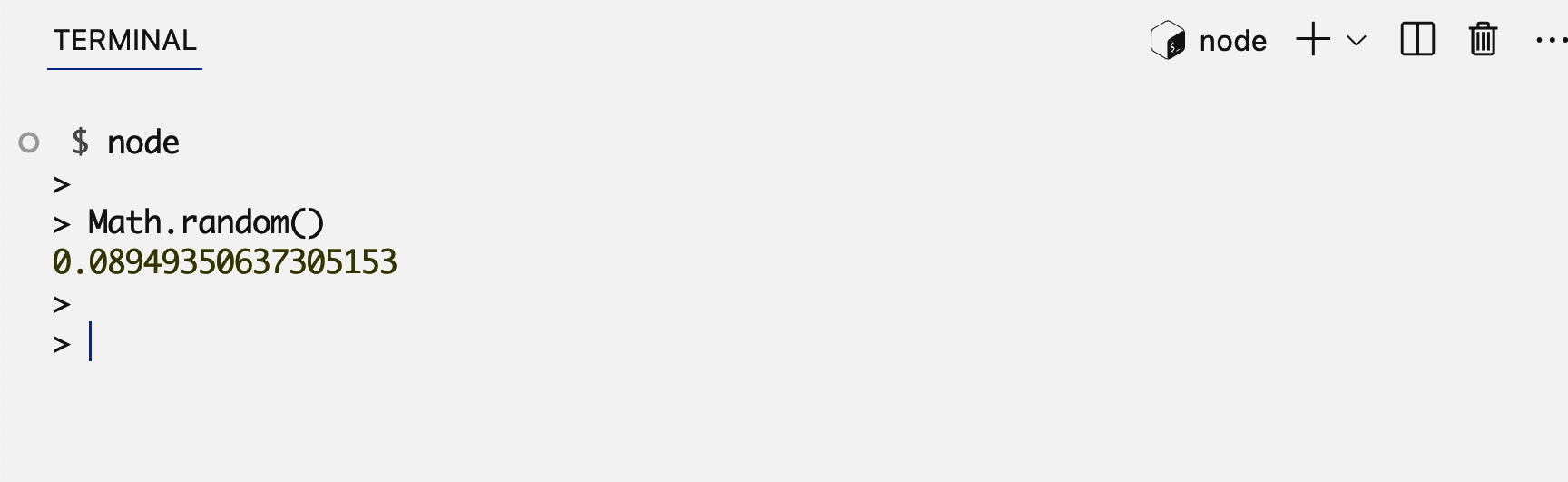
Node reads, evaluates, and prints input until Ctrl + D exits the session.
The console object is a top-level global scope object in Node, accessible
without dependencies. It is part of the global object, accessible via
globalThis.
Using Built-In Modules
Node’s built-in node:http module can be used to create a simple web server.
The provided code creates a server that listens on localhost:3000 and responds
with “Hello World”.
// Basic Web Server Example
const { createServer } = require("node:http");
const server = createServer((req, res) => {
  res.writeHead(200, { "Content-Type": "text/plain" });
  res.end("Hello World");
});
server.listen(3000, "127.0.0.1", () => {
  console.log("Server is running...");
});
Node process runs indefinitely, waiting for user requests and sending responses.
The require function in Node allows modules to use features from other
modules, such as node:http for web servers. While ES modules are the modern
standard, CommonJS is still used in many projects and libraries.
Built-in modules are globally available in Node’s REPL session but require declaration in executable scripts.
Node modules allow selective loading of functions and objects. The
createServer function from node:http is used to create a server object, with
a RequestListener function triggered by incoming connection requests.
The listener function receives request and response objects, allowing interaction with incoming requests and sending responses back.
The createServer function creates a server object, but it must be activated
using the listen method, which accepts arguments for the port, host, and a
callback function.
Using a
node:prefix for built-in modules is recommended for consistency and to distinguish them from external modules.
Using Packages
Node’s package manager, npm, is a CLI for installing and managing external packages in Node projects.
Download the lodash package using npm install, then require it in Node code to
use its methods, such as generating random numbers.
const _ = require("lodash");
console.log(_.random(1, 99));
Node will look for non-built-in modules in the node_modules folder.
Dependencies are documented in the package.json file.
The package.json file contains project information and can specify scripts and
dependencies. It can be created interactively using the npm init command.
Install new packages using npm install to add them as dependencies in
package.json. Use the --save-dev argument to add development-only
dependencies.
package.jsonfiles can specifyoptionalDependenciesandpeerDependencies, in addition todependenciesanddevDependencies.
Installing ESLint adds numerous packages due to its dependencies. Some packages,
like ESLint, require configuration files, which can be created using the npm
init command.
ES Modules
Node supports two module loaders: CommonJS, which uses require and loads
modules dynamically at runtime, and ES modules, which use import and export
statements, are determined at compile time, and are asynchronous.
ES modules can be used in Node by saving files with a .mjs extension or by
configuring Node to treat .js files as ES modules.
npm pkg set type=moduleModify the basic web server example to use ES modules. Export the server object
from server.js and import it into index.js to run the server on port 3000.
import { createServer } from "node:http";

export const server = createServer((req, res) => {
  res.writeHead(200, { "Content-Type": "text/plain" });
  res.end("Hello World");
});import { server } from "./server.js";
server.listen(3000, () => {
console.log("Server is running...");
});Named exports are preferred over default exports for consistency and maintainability. Named exports can be exported individually or collectively, while default exports require a name for import.
An Analogy for Node and npm
Coding is compared to writing cooking recipes, with the program as the recipe and the computer as the cook. Node is likened to the kitchen, providing built-in tools to execute code.
Asynchronous Operations
Dynamic imports are useful when modules are not needed immediately, do not exist at load time, or require conditional or dynamically constructed names.
A setTimeout function is used to simulate a file reading delay before starting
a web server. The server.js module is dynamically imported using the
import() function after the delay.
setTimeout(async () => {
  const { server } = await import("./server.js");
  server.listen(3000, () => {
    console.log("Server is running...");
  });
}, 5_000);
Timer Functions
Node’s timer functions, setTimeout and setInterval, behave similarly to
browser environments. They can be canceled using their respective clear
functions, clearTimeout and clearInterval.
The Non-Blocking Model
Slow operations, like reading files, block subsequent code execution.
JavaScript functions can be passed as arguments, allowing for asynchronous
operations like slowOperation to be handled using the callback pattern. This
pattern, the original implementation for asynchronous operations in Node,
involves invoking a callback function once the operation is complete.
setTimeout is an asynchronous function that uses a callback pattern to execute
a function after a specified delay. The callback function is executed after the
delay, allowing other operations to proceed concurrently.
Zero-millisecond delayed code in Node.js executes after all synchronous code following it. Timer delays are not exact, but a minimum amount of time.
Promise objects, introduced after Node’s success, represent future values and
enable asynchronous operations to be wrapped and handled later. The
node:timers module offers a promise-based setTimeout function, allowing for
non-blocking execution similar to callback-based examples.
The callback pattern can be used to handle asynchronous operations in Node.js, such as reading a file from the filesystem.
// Reading a file asynchronously
import { readFile } from "node:fs";

readFile("/Users/samer/.bash_history", function cb(error, data) {
  console.log(`Length: ${data.length}`);
});

console.log(`Process: ${process.pid}`);
Synchronous file reading blocks the main thread, potentially causing delays in web servers and other applications.
// Reading a file asynchronously with promises
import { readFile } from "node:fs/promises";

async function logFileLength() {
  const data = await readFile("/Users/samer/.bash_history");
  console.log(`Length: ${data.length}`);
}

logFileLength();

console.log(`Process: ${process.pid}`);
Asynchronous file reading, using either callback functions or Promise objects, avoids this blocking behavior.
Promise objects, particularly when used with the async/await syntax, offer a
more readable and manageable approach to asynchronous operations.
Node Built-In Modules
Ryan Dahl and early Node contributors implemented low-level modules for asynchronous APIs, enabling features like file I/O, network communication, and data compression.
This list outlines essential Node modules for mastery, though not all are necessary depending on individual needs and project scope. Some modules, like HTTPS, can be replaced with external services, while others, like wasi, are only relevant for specific use cases.
| Module | Task |
|---|---|
| node:assert | Verify invariants for testing |
| node:buffer | Represent and handle binary data |
| node:child_process | Run shell commands and fork processes |
| node:cluster | Scale a process by distributing its load across multiple workers |
| node:console | Output debugging information |
| node:crypto | Perform cryptographic functions |
| node:dns | Perform name resolutions like IP address lookup |
| node:events | Define custom events and handlers |
| node:fs | Interact with the filesystem |
| node:http | Create HTTP servers and clients |
| node:net | Create network servers and clients |
| node:os | Interact with the operation system |
| node:path | Handle paths for files and directories |
| node:perf_hooks | Measure and analyze applications performance |
| node:stream | Handle large amounts of data efficiently |
| node:test | Create and run JavaScript tests |
| node:timers | Schedule code to be executed at a future time |
| node:url | Parse and resolve URL objects |
| node:util | Access useful utility functions |
| node:zlib | Compress and decompress data |
Node Packages
Node.js ships with npm, a powerful package manager that revolutionized JavaScript development. npm provides access to over a million packages, enabling developers to build features, manage dependencies, and share code efficiently. Node and npm are valuable tools for JavaScript development, even for applications not hosted on Node servers.
Arguments Against Node
Node.js has a unique asynchronous model that may feel unfamiliar to new developers. While Node supports both CommonJS and ES modules, using them together can be confusing. Additionally, Node’s reliance on third-party libraries, lack of built-in tools for tasks like type validation and linting, and single-threaded nature for CPU-bound tasks are potential drawbacks.
Last updated on